Variables & templates
Insert chat, trigger, or HTTP data into send text, HTTP URL/body, and condition values — {{node_name.field}} in the dashboard.
On Send, HTTP, and Condition/Branch value fields, you can use {{…}} placeholders that are replaced at run time — for example the user’s message text or username.
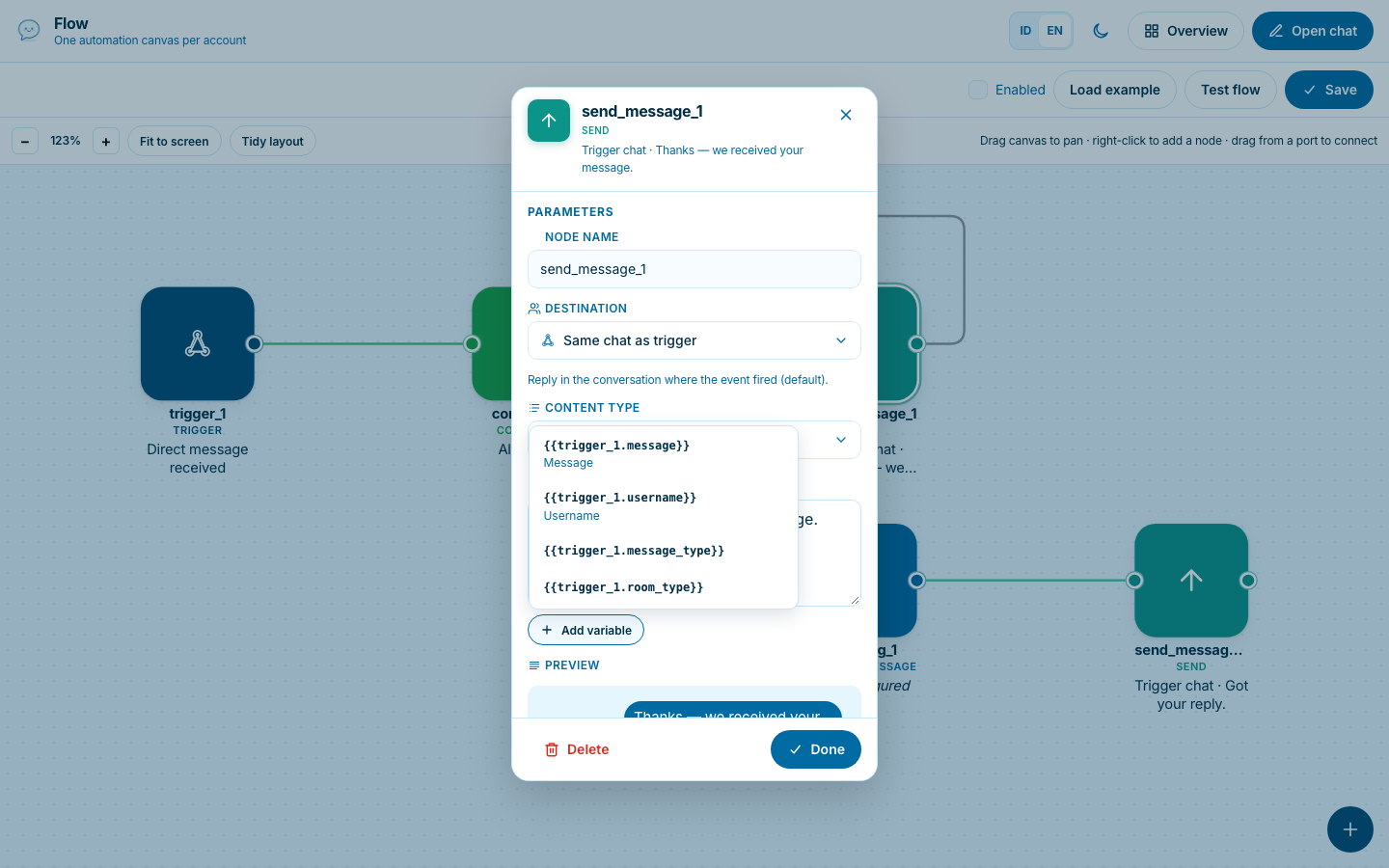
In a text field (or HTTP URL/body), click Add variable or type {{ — pick an upstream node, then a field. Example: {{trigger_1.message}}.
Syntax
| Form | Example | Meaning |
|---|---|---|
| Node + field | {{trigger_1.message}} | Value from the step named trigger_1 (label under the box on the canvas). |
| Shortcuts | {{message}}, {{username}} | Latest message / username when that step runs — not an old snapshot. |
Node names are the labels under each box (e.g. trigger_1, send_message_1, incoming_1, http_1). Each name is unique on the canvas.
How to insert in the dashboard
- Open a step panel (Send, HTTP, or a Condition value row).
- Click Add variable next to the text field, or type
{{for suggestions. - Pick a node from the list (only steps upstream on wires to this node).
- Pick a field — the
{{name.field}}snippet is inserted at the cursor.
Common fields by step type
- 1Trigger / Wait for message
Message text, username, message type, room type (personal/group/channel).
- 2Buttons / forms / polls
Button payload, form id, submit sequence, selected poll options — depending on trigger.
- 3HTTP
Status code, response body, plus mapped names after HTTP Test (e.g.
{{http_1.user_id}}).
Snapshots vs latest message
When a flow starts, Kenalko stores a snapshot of trigger data (and again each time Wait for message completes). So:
{{trigger_1.message}}on a later step still holds the initial trigger message.{{message}}follows the user’s latest message when the step is evaluated.
For multi-step flows, prefer explicit node + field ({{trigger_1.…}}, {{incoming_1.…}}) over shortcuts alone.
After an HTTP step
On the HTTP panel, run Test, then map parts of the JSON response to short names (max 20 per node). Those names appear in the variable picker as {{http_1.your_name}}. Only httpstatuscode and httpresponse are reserved (HTTP code + raw body); JSON keys like status / response may be mapped freely.
Different from Condition fields
On Condition/Branch, the left-hand Field dropdown is for rule evaluation — not for typing {{…}}. The Value column may contain {{…}} templates like send text. Details: Conditions & branches.
Captures (optional)
Some steps expose a Variables section to copy one field into a custom short name ({{your_name}}) — useful when you want a custom alias instead of node.field. Use Add capture on supported step panels.
Invalid placeholders
Unknown placeholders → replaced with an empty string at run time (the flow does not stop). References to nodes not upstream → warning on Save.
Valid placeholders depend on your trigger and upstream steps. Form fields only apply when the path involves a form submit — see Triggers & events.