HTTP step
Call an external URL (CRM, webhook) from Flow — method, headers, body, success rules, Test, and response variables.
The HTTP step sends a request to your URL when the flow reaches it — for example registering a lead in a CRM or calling an internal API. In production the request runs from Kenalko servers, not from the chat user’s browser.
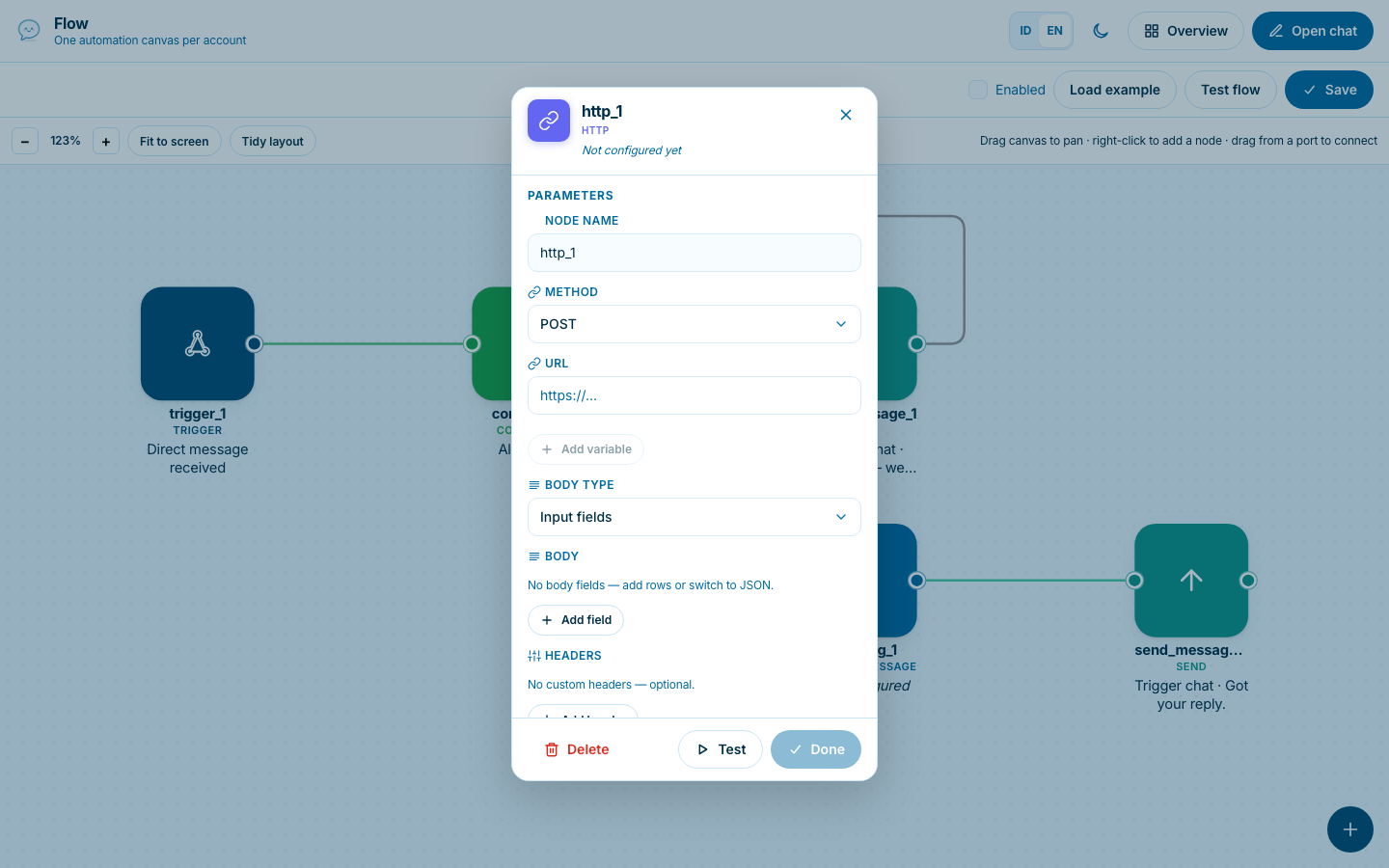
Click the HTTP box → set Method, URL, optional body/headers, Success condition, then Test before Done.
How to configure
- 1Add & wire
Canvas + → HTTP request; wire in from the previous step.
- 2URL & method
Public https:// URL; GET/POST/PUT/PATCH/DELETE. URL and body may use placeholders — see Variables & templates.
- 3Success condition
Success = HTTP status codes (e.g. 200, 201) or a field in the JSON response body.
- 4Test → Done → Save
Test must pass before Done is enabled. Change URL/body/rules → test again.
Panel sections
| Dashboard section | Purpose |
|---|---|
| Method | GET, POST, PUT, PATCH, DELETE |
| URL | HTTPS target; variables allowed |
| Headers | Optional name/value pairs (auth, content-type, etc.) |
| Body type | Input fields (key/value rows) or JSON (single editor — must be valid JSON) |
| Success condition | HTTP status code (list, e.g. 200, 201) or JSON response (top-level field + expected value; common default: status = ok). The response body must be a JSON object (not HTML, a bare array, or a primitive) — Test and live runs reject anything else |
GET usually has no body; POST/PUT/PATCH/DELETE often use JSON or input rows.
Outputs: success or failure
Two wire ports like a Condition step:
- T (green) = success condition met → wire “happy path” steps.
- F (red) = network error, timeout, status not in your success list, or JSON check failed → wire fallback (e.g. apology send).
Test vs live run
| Test (Flow HTTP panel) | Run (enabled flow / Test flow) | |
|---|---|---|
| From | Kenalko servers (same stack as production) | Kenalko servers |
| Purpose | Validate URL, body, success rules | Production / test simulation |
| CORS | Not limited by browser CORS | Not limited by browser CORS |
Test in the Form editor HTTP step still runs from your browser — the JSON object response rule is the same. When the flow runs for real, Kenalko’s server calls the URL.
Timeout
One attempt: up to 30 seconds — same cap as Developer webhook delivery.
Variables from JSON responses
After Test with a JSON object response:
- Open Generate variables / response field mapping.
- Pick or type a JSON path → short name (max 20 mappings per node). Failure-only paths (e.g.
reason) can be added even if they are missing from a successful Test sample. - On each run (T or F port), present fields are filled from the JSON object body; missing paths stay empty. Use downstream as
{{http_1.your_name}}. HTTP code and full body:{{http_1.httpstatuscode}},{{http_1.httpresponse}}(reserved).
Picker details: Variables & templates. HTTP in conditions: Conditions & branches.
Logs & retention
Each HTTP call during a run appears under Developer → Logs (Flow filter), 7-day retention — method, URL, status, latency. Per-step run summary: Runtime & logs.
Invalid JSON bodies are rejected on Test and on live runs — fix trailing commas and syntax before Save.