Chatlist
Referensi layar — / (mobile).
1 min read
Chatlist shell (/) — ChatsShellScreen + PanelStack (chatlist + panel geser).
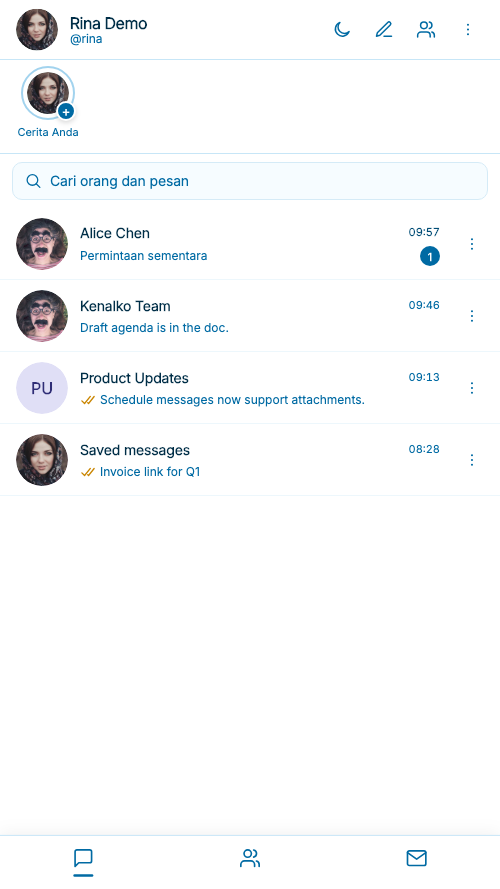
Route / — screenshot demo (UI produk).
Penjelasan layar
/ = ChatsShellScreen: chatlist + PanelStack untuk panel /contacts, /groups, dll.
Bottom nav hanya tiga pintasan: Chats · Contacts · Invitations — Grup/Channel/Pengaturan dari menu BrandBar.
Pencarian sidebar bisa menemukan orang atau lompat ke pesan; tap room → /chat/:conversationId (thread layar penuh).
Langkah
- Setelah PIN, Anda di chatlist.
- Tap room atau gunakan pencarian.
- Bottom bar: Kontak / Undangan; menu untuk Grup, Channel, Pengaturan.
Bagian layar
Atas
BrandBar— avatar, menu, chat baru, permintaan (badge)StoryRail(registered)KenSearchBar→ people + message hits
Daftar
ConversationRow— unread, pin, mute, temporary- Tap →
/chat/:conversationId - Load-more chatlist
Nav bawah
KenShellBottomNav: Chats · Contacts · Invitations- Grup/Channel/Pengaturan lewat menu BrandBar
Back
- Panel terbuka: system back →
/
Indeks: Ringkasan Pages.